Python
import os
from gcore import Gcore
client = Gcore(
api_key=os.environ.get("GCORE_API_KEY"), # This is the default and can be omitted
)
vod_statistics_series = client.streaming.statistics.get_vod_unique_viewers_cdn(
from_="from",
to="to",
)
print(vod_statistics_series)package main
import (
"context"
"fmt"
"github.com/G-Core/gcore-go"
"github.com/G-Core/gcore-go/option"
"github.com/G-Core/gcore-go/streaming"
)
func main() {
client := gcore.NewClient(
option.WithAPIKey("My API Key"),
)
vodStatisticsSeries, err := client.Streaming.Statistics.GetVodUniqueViewersCDN(context.TODO(), streaming.StatisticGetVodUniqueViewersCDNParams{
From: "from",
To: "to",
})
if err != nil {
panic(err.Error())
}
fmt.Printf("%+v\n", vodStatisticsSeries)
}
curl --request GET \
--url https://api.gcore.com/streaming/statistics/vod/viewers \
--header 'Authorization: <api-key>'const options = {method: 'GET', headers: {Authorization: '<api-key>'}};
fetch('https://api.gcore.com/streaming/statistics/vod/viewers', options)
.then(res => res.json())
.then(res => console.log(res))
.catch(err => console.error(err));<?php
$curl = curl_init();
curl_setopt_array($curl, [
CURLOPT_URL => "https://api.gcore.com/streaming/statistics/vod/viewers",
CURLOPT_RETURNTRANSFER => true,
CURLOPT_ENCODING => "",
CURLOPT_MAXREDIRS => 10,
CURLOPT_TIMEOUT => 30,
CURLOPT_HTTP_VERSION => CURL_HTTP_VERSION_1_1,
CURLOPT_CUSTOMREQUEST => "GET",
CURLOPT_HTTPHEADER => [
"Authorization: <api-key>"
],
]);
$response = curl_exec($curl);
$err = curl_error($curl);
curl_close($curl);
if ($err) {
echo "cURL Error #:" . $err;
} else {
echo $response;
}HttpResponse<String> response = Unirest.get("https://api.gcore.com/streaming/statistics/vod/viewers")
.header("Authorization", "<api-key>")
.asString();require 'uri'
require 'net/http'
url = URI("https://api.gcore.com/streaming/statistics/vod/viewers")
http = Net::HTTP.new(url.host, url.port)
http.use_ssl = true
request = Net::HTTP::Get.new(url)
request["Authorization"] = '<api-key>'
response = http.request(request)
puts response.read_body[
{
"client": 123,
"metrics": {
"vod": [
[
1640995210,
10
],
[
1640995310,
10
],
[
1640995410,
10
],
[
1640995510,
20
],
[
1640995610,
20
]
]
}
}
]{
"data": [],
"errors": [
"from: query param is not set"
]
}{
"data": [],
"errors": [
"internal server error"
]
}Statistics
Get VOD unique viewers via CDN
Calculates time series of unique viewers of VOD via CDN.
The statistics are taken from the data of CDN and work regardless of which player the views were made with.
Works similar to the method /statistics/cdn/uniqs. But this allows you to break down data with the specified granularity: minutes, hours, days.
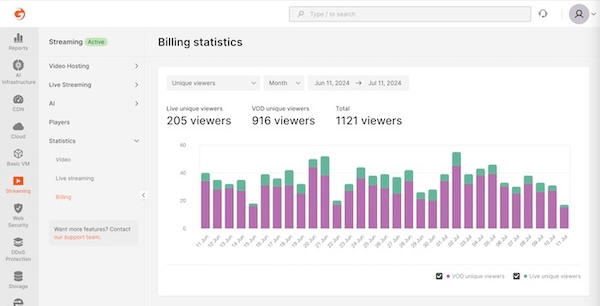
Based on this method, a graph of unique views in the Customer Portal is built.
GET
/
streaming
/
statistics
/
vod
/
viewers
Python
import os
from gcore import Gcore
client = Gcore(
api_key=os.environ.get("GCORE_API_KEY"), # This is the default and can be omitted
)
vod_statistics_series = client.streaming.statistics.get_vod_unique_viewers_cdn(
from_="from",
to="to",
)
print(vod_statistics_series)package main
import (
"context"
"fmt"
"github.com/G-Core/gcore-go"
"github.com/G-Core/gcore-go/option"
"github.com/G-Core/gcore-go/streaming"
)
func main() {
client := gcore.NewClient(
option.WithAPIKey("My API Key"),
)
vodStatisticsSeries, err := client.Streaming.Statistics.GetVodUniqueViewersCDN(context.TODO(), streaming.StatisticGetVodUniqueViewersCDNParams{
From: "from",
To: "to",
})
if err != nil {
panic(err.Error())
}
fmt.Printf("%+v\n", vodStatisticsSeries)
}
curl --request GET \
--url https://api.gcore.com/streaming/statistics/vod/viewers \
--header 'Authorization: <api-key>'const options = {method: 'GET', headers: {Authorization: '<api-key>'}};
fetch('https://api.gcore.com/streaming/statistics/vod/viewers', options)
.then(res => res.json())
.then(res => console.log(res))
.catch(err => console.error(err));<?php
$curl = curl_init();
curl_setopt_array($curl, [
CURLOPT_URL => "https://api.gcore.com/streaming/statistics/vod/viewers",
CURLOPT_RETURNTRANSFER => true,
CURLOPT_ENCODING => "",
CURLOPT_MAXREDIRS => 10,
CURLOPT_TIMEOUT => 30,
CURLOPT_HTTP_VERSION => CURL_HTTP_VERSION_1_1,
CURLOPT_CUSTOMREQUEST => "GET",
CURLOPT_HTTPHEADER => [
"Authorization: <api-key>"
],
]);
$response = curl_exec($curl);
$err = curl_error($curl);
curl_close($curl);
if ($err) {
echo "cURL Error #:" . $err;
} else {
echo $response;
}HttpResponse<String> response = Unirest.get("https://api.gcore.com/streaming/statistics/vod/viewers")
.header("Authorization", "<api-key>")
.asString();require 'uri'
require 'net/http'
url = URI("https://api.gcore.com/streaming/statistics/vod/viewers")
http = Net::HTTP.new(url.host, url.port)
http.use_ssl = true
request = Net::HTTP::Get.new(url)
request["Authorization"] = '<api-key>'
response = http.request(request)
puts response.read_body[
{
"client": 123,
"metrics": {
"vod": [
[
1640995210,
10
],
[
1640995310,
10
],
[
1640995410,
10
],
[
1640995510,
20
],
[
1640995610,
20
]
]
}
}
]{
"data": [],
"errors": [
"from: query param is not set"
]
}{
"data": [],
"errors": [
"internal server error"
]
}Authorizations
API key for authentication. Make sure to include the word apikey, followed by a single space and then your token.
Example: apikey 1234_abcdef
Query Parameters
Start of time frame. Format is date time in ISO 8601
End of time frame. Format is date time in ISO 8601
Filter by video "slug"
Filter by user "id"
Specifies the time interval for grouping data
Available options:
1m, 5m, 15m, 1h, 1d Was this page helpful?